

The Shopify variant limit is one of the most-searched merchant frustrations on the platform. For years, every store was capped at 100 variants per product, and stores selling customized or made-to-order goods kept hitting that wall.
In October 2025, Shopify raised the ceiling to 2,048 variants per product. The problem is not solved. The 3-option ceiling has not moved, theme and app compatibility gaps slow the rollout, and many stores still see the old 100 cap in practice.
This guide walks you through the no-code way to overcome the Shopify variant limit in 2026. You will see when to use which workaround, why a product options app is the path most merchants now choose, and how to set it up step by step without touching theme code.
What Is the Shopify Variant Limit?
A variant is a specific version of a product, defined by the options a customer can select. A Size Medium, Red, Cotton t-shirt is one variant. A Size Large, Blue, Polyester version of the same t-shirt is another. Each variant carries its own SKU, inventory count, price, and barcode in Shopify.
Variants vs Options Explained
Two terms, product variations and product options, are used interchangeably but mean different things. Options are the attribute categories (Size, Color, Material). Variants are the unique combinations of those option values. A product with 3 sizes and 4 colors has 2 options and 12 variants.
The Original 100-variant Cap And Why It Existed
Shopify originally limited every product to 100 variants and 3 options to protect performance. For most early stores, 100 was enough. For made-to-order, custom apparel, furniture, and B2B stores, it became one of the biggest frustrations on the platform.
Why the 3-option Ceiling is the Bigger Problem
What did not change is the 3-option limit. A product can still only have three option dimensions, such as Size, Color, and Material. For merchants who need a fourth or fifth dimension like Fit, Engraving, Personalization, or File Upload, the 2,048 update changes nothing. This is the real limit most customization-heavy stores still hit in 2026.
Why the Shopify Variant Limit Still Holds Stores Back in 2026
Reading the announcement, you would think the variant problem is solved. In real-world stores, it is not, and the reasons are worth understanding before you choose a workaround.
i. The 3-option Ceiling Has Not Moved
If your business needs more than three option categories on a single product, you are still blocked. A custom apparel store offering Size, Color, Fit, Print Location, and Uploaded Artwork needs five dimensions. Shopify still allows three.
ii. Performance Issues at Scale
Even when the platform allows 2,048 variants, the user experience can break. Pages with thousands of variants slow down and mobile selectors become unusable. Research from Ablestar on high-variant catalogs notes that themes restrict the Liquid ‘product.variants’ object to 250 entries to protect performance, and recommends progressive disclosure for large products.
iii. Theme And App Compatibility Gaps
Most Shopify themes and many apps were built assuming the 100-variant ceiling. When you push past 100, search apps, subscription apps, reviews, bundles, feeds, and analytics tools may break or run slowly.
iv. Eligibility And Rollout Inconsistencies
The 2,048 update has rolled out broadly, but many stores still see the 100 cap in practice. Real merchant complaints continue to appear on the Shopify community forum describing stores not yet activated for the higher limit or blocked by app compatibility.
5 Ways to Overcome the Shopify Variant Limit (Ranked by Difficulty)
There are five common workarounds, ranked from easiest to hardest. Use the table as a quick reference, then read the sections to see which fits your store.
| Method | Difficulty | Code required | Best for |
| 1. No-code product options app | Easy | No | Most stores |
| 2. Split products into listings | Medium | No | Tiny catalogs |
| 3. Line item properties | Medium | Light | Simple personalization |
| 4. Custom theme code merge | Hard | Yes | Risk-tolerant teams |
| 5. Shopify Plus and API | Enterprise | Yes | Large brands |
Method 1: Use a No-code Product Options App (Recommended for Most)
A product options app extends Shopify’s native variant system with extra fields, options, and logic. You install the app, configure options inside an admin panel, and they appear on your product pages without any code. This is the most common path in 2026 and the one we walk through below.
Method 2: Split Products into Multiple Listings (Manual, No-code)
You create separate product listings for each major variation, then link them with swatches that act as links. This works for very small catalogs, but the hidden costs include duplicate SEO content, fractured inventory reporting, and messy analytics. It gets unmanageable fast as your catalog grows.
Method 3: Use Line Item Properties (Basic, Light code)
Line item properties let you add fields like custom text or an upload that travel with the order without becoming true variants. The downside is significant. You cannot assign per-variant inventory, pricing, SKUs, or barcodes to these properties. They are notes attached to a line item, not full variants.
Method 4: Custom Theme Code to Merge Products (Advanced, Risky)
Developers can write Liquid code that visually merges multiple Shopify products into one product page, combining their variant counts. This adds technical debt, breaks easily with theme updates, and creates SEO risk through duplicate content. Unless you have a dedicated developer, this method is rarely worth it.
Method 5: Shopify Plus And Custom API Work (Enterprise)
For very large brands, custom backend work using the Shopify GraphQL Admin API combined with a headless or custom storefront can deliver any catalog structure you want. This is powerful but expensive, slow to build, and only justified at enterprise scale.
Why a No-Code Product Options App Is the Best Path for Most Stores
Unless you are running a Plus enterprise store with a development team, a product options app is almost always the right answer. Here is why.
i. Zero Risk to Your Theme or Storefront
A good options app overlays on top of your existing theme without modifying core Liquid files. If you uninstall the app, your storefront returns to its default state. This is the opposite of custom code, which leaves permanent dependencies.
ii. Unlimited Options Beyond the 3-option Ceiling
This is the biggest win. A product options app does not respect Shopify’s 3-option limit. Add as many option dimensions as your product needs, whether that is five, ten, or more.
iii. Custom Fields, File Uploads, And Conditional Logic
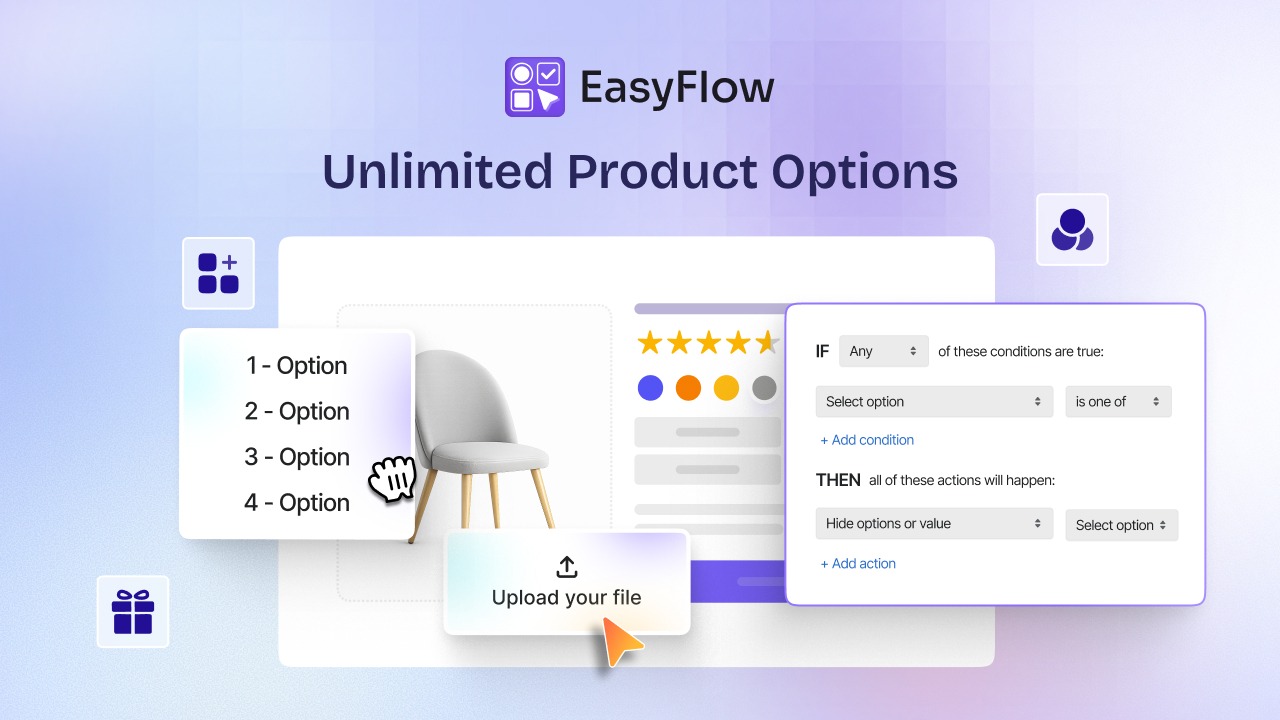
Beyond simple dropdowns, modern options apps support text inputs, color swatches, image swatches, file uploads, and conditional logic that shows or hides options based on previous selections. This turns a clunky dropdown list into a guided product configurator.
iv. Price Add-ons And Dynamic Pricing
Custom add-ons such as engraving, premium materials, or expedited production carry their own price modifiers that update at checkout in real time. This unlocks revenue you cannot capture with native variants.
v. Works on Every Shopify Plan
You do not need Shopify Plus. Most options apps work on Basic, Shopify, and Advanced plans, which makes this the most accessible path for small and mid-size merchants.
How to Overcome the 100-Variant Cap with EasyFlow (Step by Step)
This is where things get practical. EasyFlow is a no-code product options app for Shopify that adds unlimited custom options, conditional logic, file uploads, and price add-ons to any product page. Here is how to set it up.
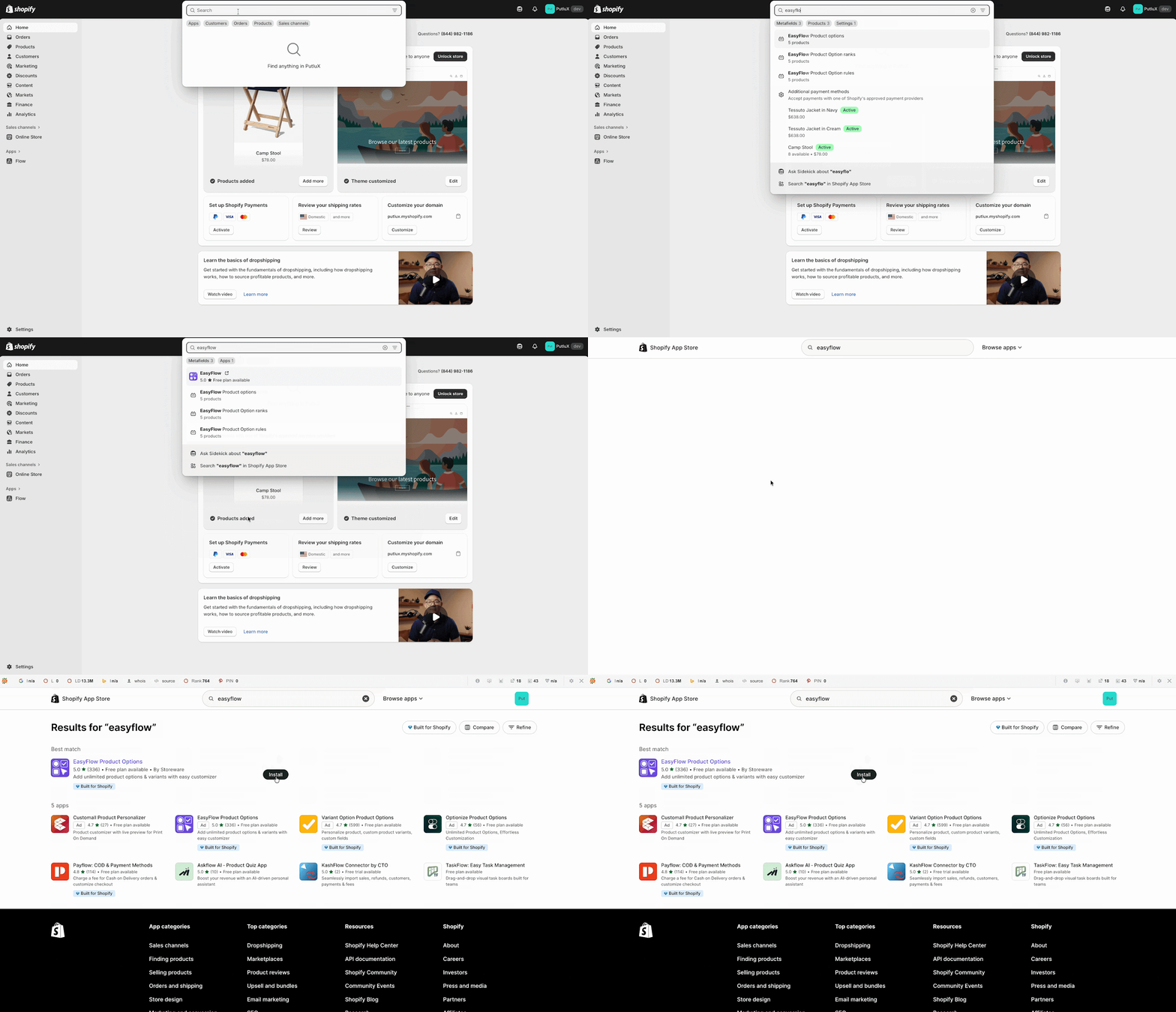
Step 1: Install EasyFlow from the Shopify App Store
Search for EasyFlow Product Options in the Shopify App Store and install it on your store. The configuration panel appears inside your Shopify admin once approval completes.
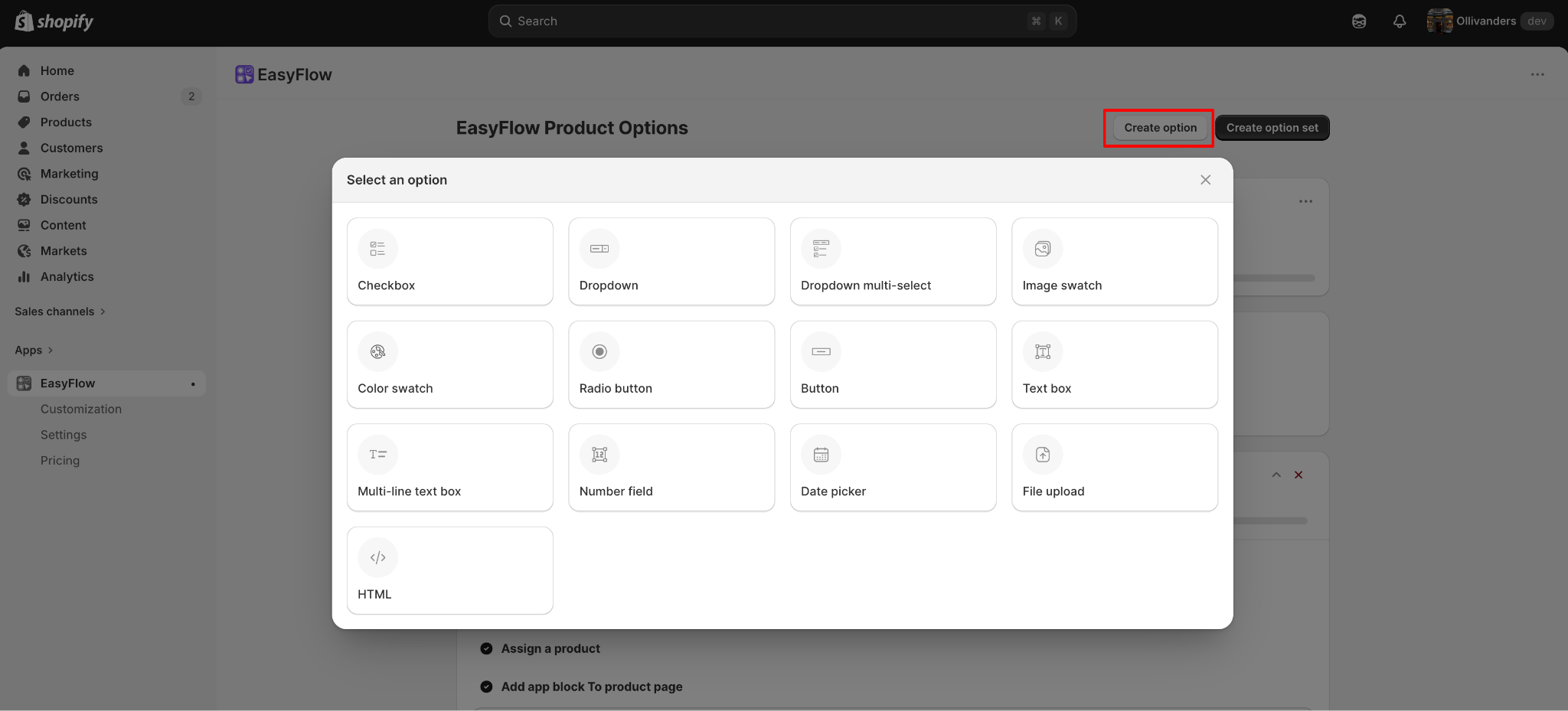
Step 2: Define Options Beyond Shopify’s 3-option Limit
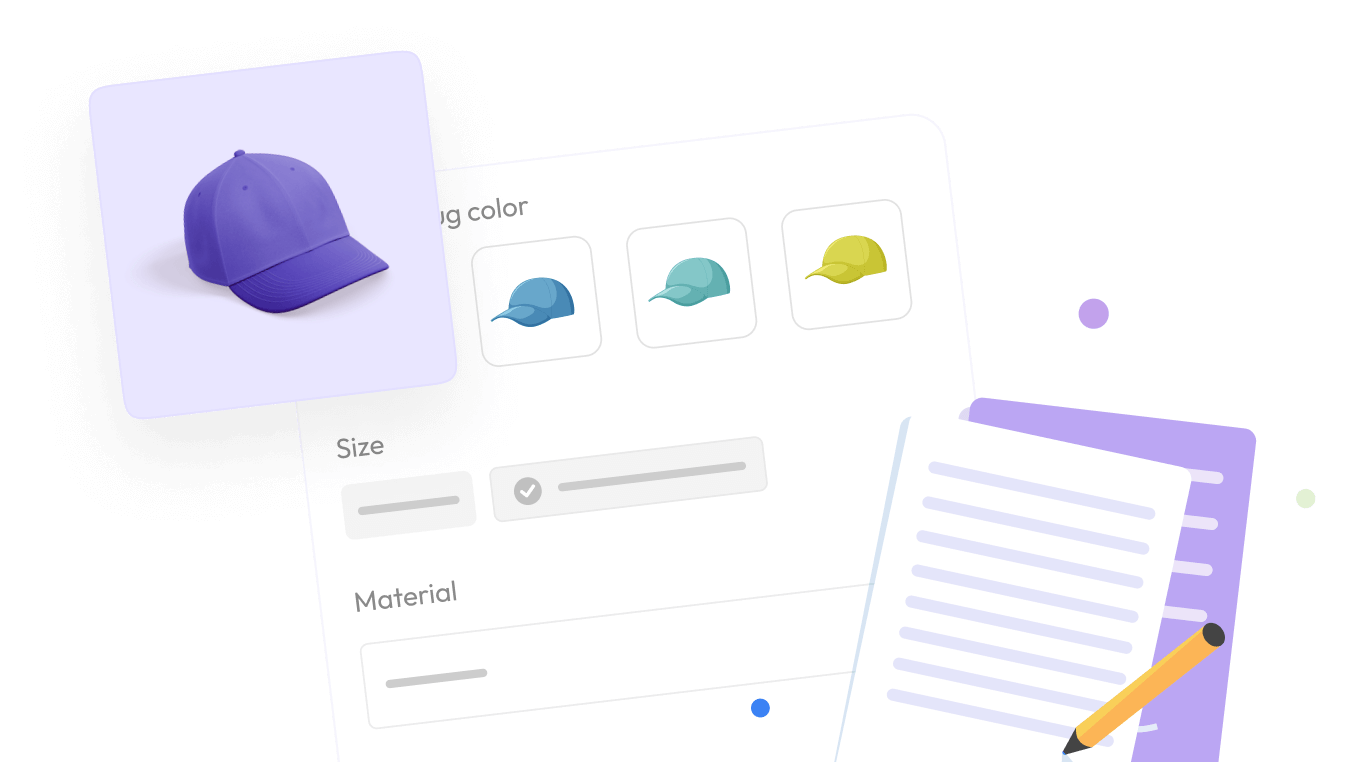
From the EasyFlow dashboard, you can set up product options with any field type you need, including dropdowns, swatches, radio buttons, checkboxes, text fields, number fields, and date pickers. Add as many option categories as your product needs.
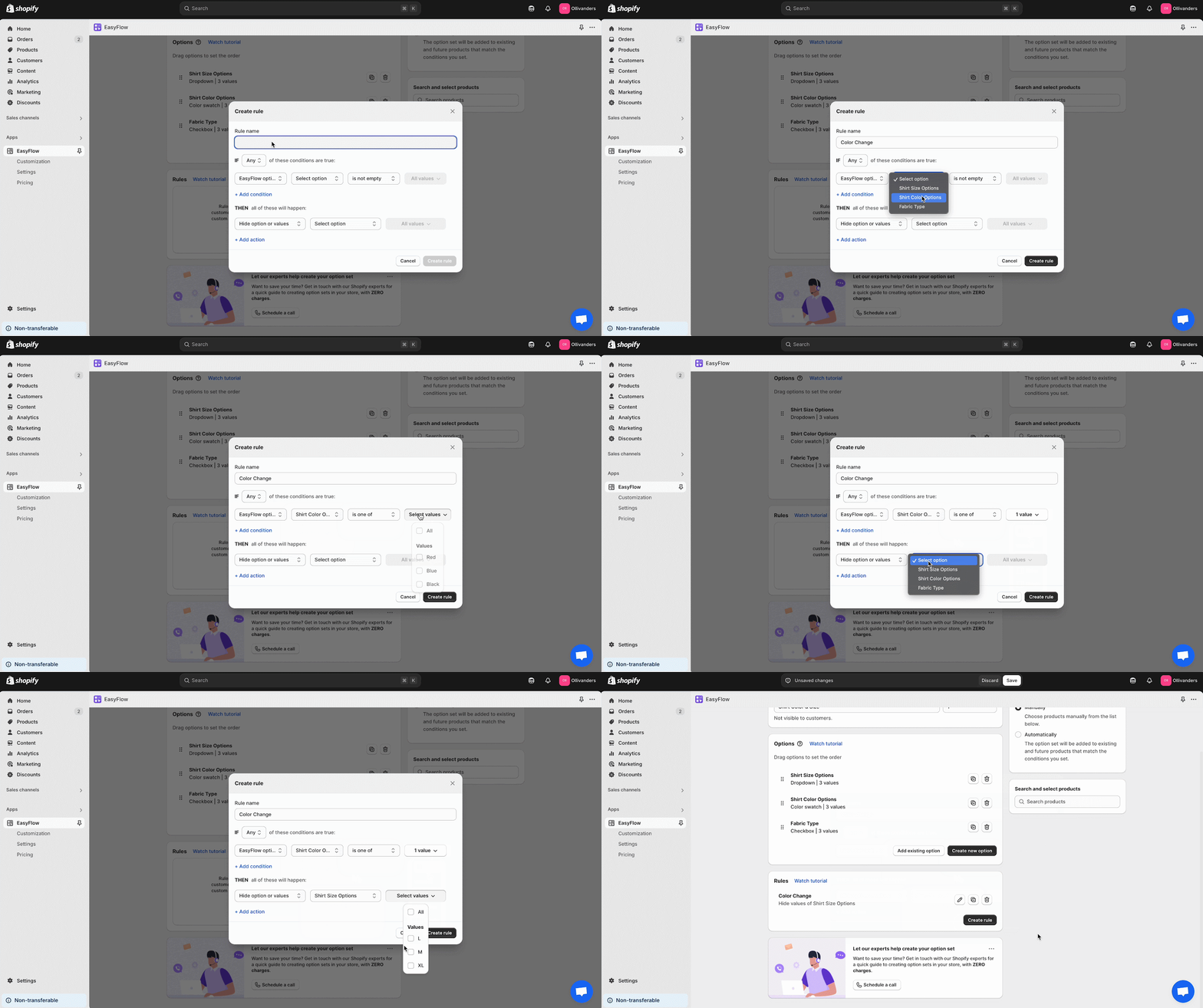
Step 3: Add Conditional Logic to Keep the Product Page Clean
Long option lists overwhelm shoppers fast. With EasyFlow’s conditional logic rules, you can show or hide options based on previous selections. For example, “Engraving font” only appears after the customer chooses “Add engraving.”
Step 4: Enable Price Add-ons for Custom Upgrades
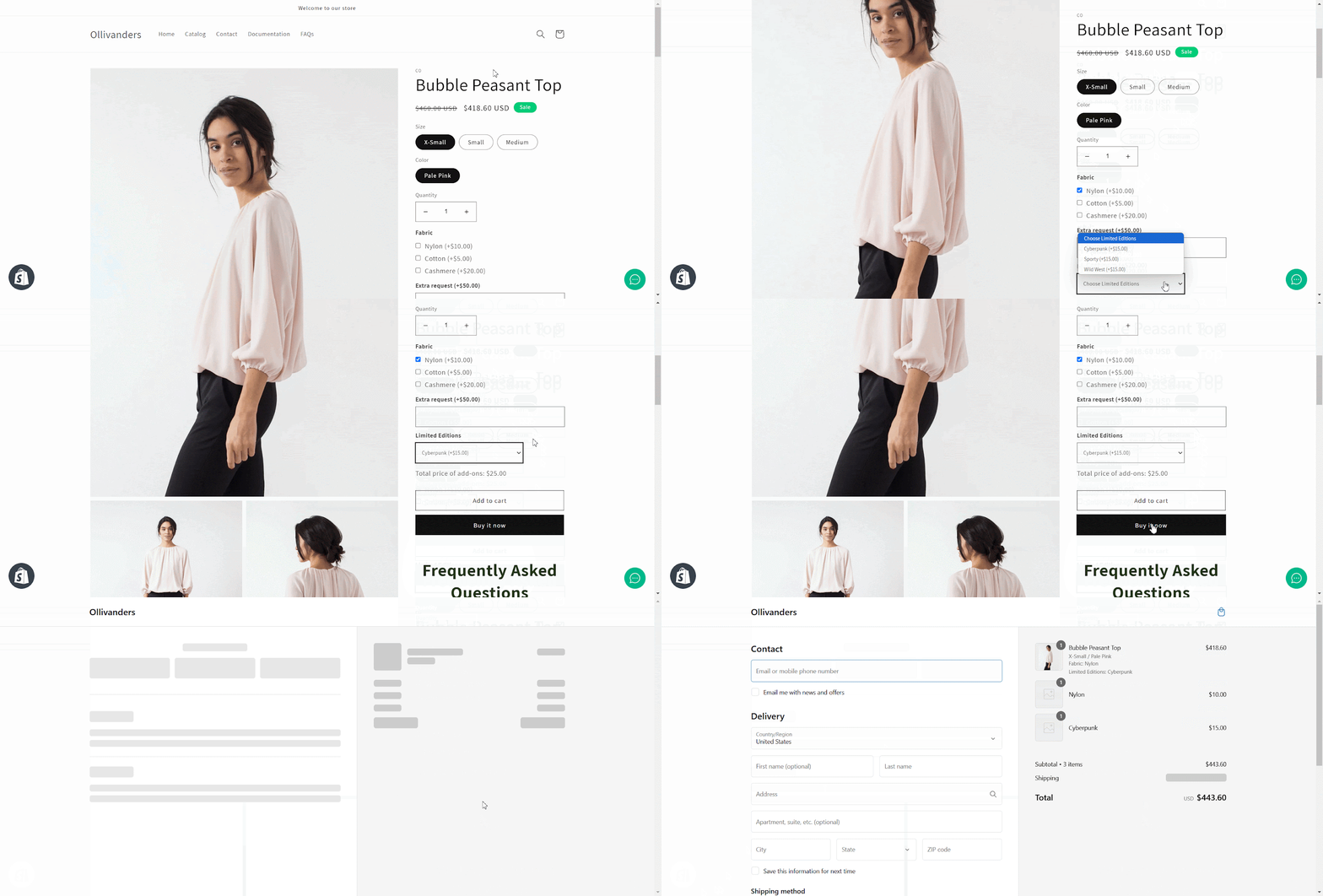
Use the price add-ons feature to attach upgrade fees to specific options. A premium fabric upgrade can add $25, a personalized print can add $10, and a rush order can add a flat shipping fee. All updates live in the cart total.
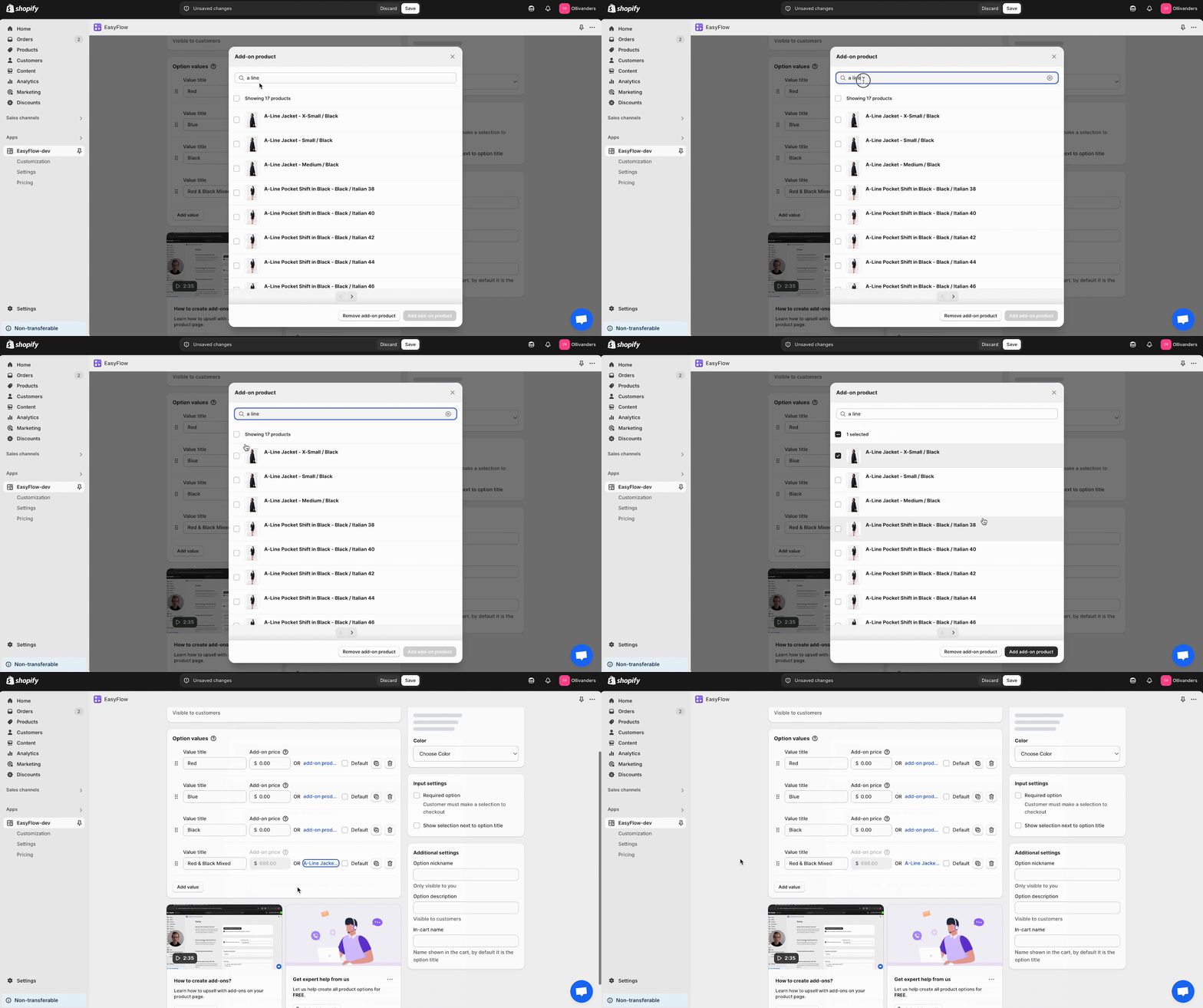
Step 5: Test on Storefront And Publish
Preview the product page on your storefront, test each option combination, and verify that the cart and checkout show the correct selections and pricing. Once everything checks out, publish, and your shoppers see the new options instantly.
Real-World Use Cases for Going Beyond 100 Variants
Different industries hit the variant cap for different reasons. Here is how the no-code approach plays out across the most common store types.
1. Custom Apparel And Personalized Products
Custom apparel brands typically need Size, Color, Fit, Print Location, and a file upload option for customer artwork. Five dimensions on one product is impossible with Shopify’s native 3-option ceiling.
2. Furniture And Home Goods
A sectional sofa might have Material, Color, Configuration, Leg Style, and Cushion Firmness. Five to six dimensions are normal here, and customers expect to see them all on one product page.
3. Print-on-Demand Stores
POD merchants juggle Garment Type, Color, Size, Print Location, Artwork, and sometimes Brand. Without an options app, these stores end up splitting products and losing SEO consolidation.
4. Jewelry, Gifts, And Made-to-order Goods
Jewelry sellers commonly offer Metal, Stone, Setting Style, Engraving Text, Font, and Gift Wrapping. A made-to-order workflow needs all of these visible on one page with live pricing.
5. B2B catalogs with Complex SKU Combinations
B2B stores often need dozens of configuration combinations, especially in industrial parts, signage, packaging, and uniforms. An options app keeps everything in one place without destroying the merchandising flow.
Best Practices for High-Variant Product Pages
Going past 100 variants is only useful if the customer experience holds up. These practices keep the page fast, clean, and easy to convert.
- Use progressive disclosure: Do not show every option at once. Reveal options as the customer makes earlier selections. This keeps the page visually clean and reduces decision fatigue.
- Manage page weight and load speed: Variant-heavy pages can balloon in size. Use asynchronous loading where possible, compress images, and avoid loading every variant image until it is needed. Lighthouse scores matter for both SEO and conversion.
- Make mobile selectors thumb-friendly: Nearly 75 percent of Shopify traffic comes from mobile. Option selectors should be large enough to tap, swatches should be visually clear, and complex dropdowns should be replaced with bottom sheets or modal pickers on small screens.
- Handle out-of-stock states clearly: When a combination is unavailable, show it as out of stock rather than letting the customer dead-end. Offer back-in-stock notifications by variant so you do not lose interested buyers.
- Capture customization data the right way: When customers personalize a product, capture every detail in a format your fulfillment team can use directly. EasyFlow passes this data into the cart, checkout, and order details in clean, labeled fields.
How Product Options Affect AI-Driven Search Visibility
There is one more reason to think carefully about product options in 2026, and competitor articles miss it entirely. AI shopping assistants like ChatGPT, Perplexity, and Google AI Mode are becoming a real product discovery channel, and they match shopper queries against structured product attributes.
A product page with rich, well-labeled options gives AI more signals to match against conversational queries like “a personalized cotton t-shirt with custom print under 40 dollars.” A page with three thin variant categories gets skipped. Every option you expose becomes an attribute AI can read, which means a no-code options app is also a visibility infrastructure for the next generation of search.
FAQs (Frequently Asked Questions)
Does Shopify still have a 100-variant limit in 2026?
How many product options can I have on Shopify?
What is the easiest way to bypass the Shopify variant limit?
Can I add unlimited variants in Shopify without coding?
Will splitting products affect my SEO?
Do product options apps work with all Shopify themes?
Can I use a product options app on the Shopify Basic plan?
What happens to custom options when a customer reaches checkout?
Overcome the Shopify Variant Limit Using EasyFlow
The Shopify variant limit has evolved, but the underlying customization problem has not gone away. The 2,048-variant update helps catalog depth, but the 3-option ceiling and ecosystem gaps still block most made-to-order, custom, and configurable stores.
A no-code product options app remains the fastest, lowest-risk path forward in 2026. It avoids the SEO damage of splitting products, the technical debt of custom code, and the cost of enterprise development.
If you are ready to break past the variant cap without touching code, explore EasyFlow’s full feature set or check the pricing plans to find the right plan for your store.